SQL Snippets
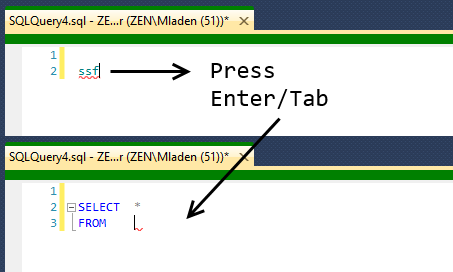
SQL Snippets inserts reusable SQL code into the SSMS editor using custom shortcuts. Type a shortcut and press
Enter or Tab to expand it into a predefined code block. You can have as many SQL snippets
as you wish.
The Last used on property shows the last time a snippet was used. Use {CB} as a placeholder to insert clipboard text when the snippet is expanded from its shortcut text.
You can choose which snippets to export/import. When importing you can also specify if you want to overwrite a snippet that already exists with the same shortcut or change it in any way.
Use {C} where you want your cursor to be after the snippet has been expanded.
Snippets can be saved to HTML or printed out directly.
Snippets can be exported and imported independently of other settings.
The Last used on property shows the last time a snippet was used. Use {CB} as a placeholder to insert clipboard text when the snippet is expanded from its shortcut text.
You can choose which snippets to export/import. When importing you can also specify if you want to overwrite a snippet that already exists with the same shortcut or change it in any way.
Use {C} where you want your cursor to be after the snippet has been expanded.
Snippets can be saved to HTML or printed out directly.
Snippets can be exported and imported independently of other settings.